Chart Properties
Data
| Name |
Description |
Property Type |
| data |
An array of objects for trend data |
Array |
Data Array Object
| Name |
Description |
Property Type |
| name |
The name of the data object member |
String |
| dataset |
Contains the data points for the plot |
Dataset |
| containsNaN |
Specifies if NaN values are in the dataset |
Boolean |
| isSorted |
Specifies if the values in the dataset are sorted |
Boolean |
Example of Data Prop:
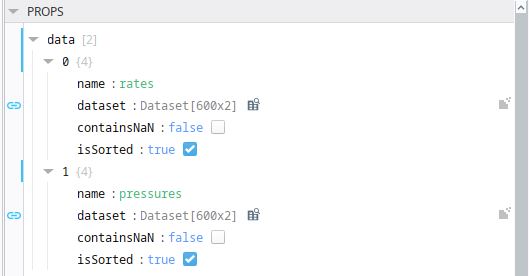
It is helpful to have the the dataset structured with timestamp in the first column.
Plots: (Future Release)
| Name |
Description |
Property Type |
| |
|
|
| |
|
|
Axes
| Name |
Description |
Property Type |
| axes |
An object containing defined axes arrays for both x and y |
Object |
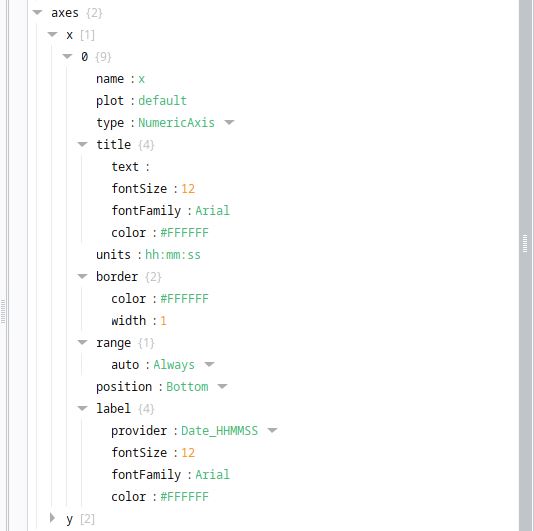
X Axis Array Object
| Name |
Description |
Property Type |
| name |
The name of the axis |
String |
| plot |
The type of plot displayed. Default value is default |
String |
| type |
The axis type for the plot |
Object |
| title |
The title for the axis |
Object |
| units |
Specifies the units of measure for axis title |
String |
| border |
Control for the axis border |
Object |
| range |
Controls the range of the axis |
Object |
| position |
Controls the position of the axis on the chart. Options are Left, Right, Up, and Down |
String |
| label |
The label configuration for the axis |
Object |
Type
| Name |
Description |
Property Type |
| CategoryAxis |
Text axis suitable to chart out text based items or categories |
String |
| DateTimeNumericAxis |
Value axis suitable when the axis data is DateTime |
String |
| NumericAxis |
Value axis suitable when the axis data is numeric |
String |
| LogarithmicAxis |
Value axis suitable for numeric data to be presented in logarithmic |
String |
Title
| Name |
Description |
Property Type |
Default |
| text |
The displayed axis title |
String |
X Axis |
| fontSize |
Font configuration for the title |
Double |
12 |
| fontFamily |
Specifies the font for the title. Examples are Arial, Times, etc. |
String |
Arial |
| color |
Specifies the color for the title |
String |
--neutral-90 |
Border
| Name |
Description |
Property Type |
Default |
| color |
Controls the border color |
String |
--neutral-90 |
| width |
Controls the border thickness of the axis |
Double |
1 |
Label
| Name |
Description |
Property Type |
Default |
| provider |
See details for this object and its members below... |
|
NoFormat |
| fontSize |
Font size configuration for the label |
Double |
12 |
| fontFamily |
Specifies the font family for the label. Examples are Arial, Times, etc. |
String |
Arial |
| color |
Specifies the color for the label |
String |
--neutral-90 |
Range.Auto
| Name |
Description |
Property Type |
| Always |
Autorange the IAxis instance always. In this case zooming is not allowed by user. Only AxisDragModifier UI interaction is allowed. |
String |
| Never |
Never autoranges the the IAxis instance. |
String |
| Once |
Allows the IAxis instance decide whether autorange or not when VisibleRange is null or undefined |
String |
Y Axis Array Object
| Name |
Description |
Property Type |
| name |
The name of the axis |
String |
| plot |
The type of plot displayed. Default value is default |
String |
| type |
The axis type for the plot |
Object |
| title |
The title for the axis |
Object |
| units |
Specifies the units of measure for axis title |
String |
| border |
Control for the axis border |
Object |
| range |
Controls the range of the axis |
Object |
| position |
Controls the position of the axis on the chart. Options are Left, Right, Up, and Down |
String |
| label |
The label configuration for the axis |
Object |
Type
| Name |
Description |
Property Type |
| CategoryAxis |
Text axis suitable to chart out text based items or categories |
String |
| DateTimeNumericAxis |
Value axis suitable when the axis data is DateTime |
String |
| NumericAxis |
Value axis suitable when the axis data is numeric |
String |
| LogarithmicAxis |
Value axis suitable for numeric data to be presented in logarithmic |
String |
Title
| Name |
Description |
Property Type |
Default |
| text |
The displayed axis title |
String |
Y Axis |
| fontSize |
Font configuration for the title |
Double |
12 |
| fontFamily |
Specifies the font for the title. Examples are Arial, Times, etc. |
String |
Arial |
| color |
Specifies the color for the title |
String |
--neutral-90 |
Border
| Name |
Description |
Property Type |
Default |
| color |
Controls the border color |
String |
--neutral-90 |
| width |
Controls the border thickness of the axis |
Double |
1 |
Label
| Name |
Description |
Property Type |
Default |
| provider |
See details for this object and its members below... |
|
NoFormat |
| fontSize |
Font size configuration for the label |
Double |
12 |
| fontFamily |
Specifies the font family for the label. Examples are Arial, Times, etc. |
String |
Arial |
| color |
Specifies the color for the label |
String |
--neutral-90 |
Range.Auto
| Name |
Description |
Property Type |
| Always |
Autorange the IAxis instance always. In this case zooming is not allowed by user. Only AxisDragModifier UI interaction is allowed. |
String |
| Never |
Never autoranges the the IAxis instance. |
String |
| Once |
Allows the IAxis instance decide whether autorange or not when VisibleRange is null or undefined |
String |
Provider
| Name |
Description |
Property Type |
| provider |
An object containing formats for the axis label |
Object |
Provider Members
| Name |
Description |
Property Type |
| NoFormat |
Specifies No Formatting to the axis labels (defaults to integer whole values) |
String |
| Decimal |
Formats the axis labels with a single decimal place |
String |
| SignificantFigures |
Formats the axis labels as a whole number (no decimal places) |
String |
| Date_DDMMYYYY |
Formats the axis label to DateTime (eg. 12/31/1969) |
String |
| Date_DDMMYY |
Formats the axis label to DateTime (eg. 01/01/70) |
String |
| Date_DDMMHHMM |
Formats the axis label to DateTime (eg. 01/01 00:00) |
String |
| Date_DDMM |
Formats the axis label to DateTime (eg. 01/01/70) |
String |
| Date_HHMM |
Formats the axis label to DateTime (eg. 01/01) |
String |
| Date_HHMMSS |
Formats the axis label to DateTime (eg. 00:00) |
String |
| Exponential |
Formats the axis label to exponential notation (eg. 2.0e+1) |
String |
| Scientific |
Formats the axis label to scientific notation (eg. 3x10³) |
String |
Pens Array Object
| Name |
Description |
Property Type |
| |
An array of pens to display on the graph |
Array |
| name |
The name of the pen to be displayed in the legend on the chart |
String |
| visible |
Determines if the pen is visible on the chart or not |
Boolean |
| type |
The chart type desired. Options are Line, Scatter, Column, Mountain and Spline |
String |
| interpolationPoints |
Used with the Spline and MountainSpline type curves to set the interpolation filter - a higher value results in a smoother waveform - only visible when MountainSpline or Spline curves are selected |
Integer |
| axis |
Defines the axes (x and y) for the selected pen |
Object |
| data |
Defines where the data for the pen is coming from |
Object |
| stroke |
Configuration of the line on the chart corresponding to a specific pen |
Object |
Type
| Name |
Description |
Property Type |
| Line |
A series of data points connected by line segments |
String |
|
Scatter
|
Shows large quantities of data along a horizontal and vertical axis and presents a correlation between two variables |
String |
| Column |
A type of graph that uses vertical bars or columns to represent the values of the data |
String |
| Mountain |
Essentially the same as a line chart with the area filled in under the curve |
String |
| MountainSpline |
A spline chart with the area under the curve filled in |
String |
| Spline |
A line chart where the data points are connected using spline interpolation |
String |
Axis
| Name |
Description |
Property Type |
| x |
Sets the pen x axis to the named x axis in the axes array object |
String |
|
y
|
Sets the pen y axis to the named y axis in the axes array object |
String |
Data
| Name |
Description |
Property Type |
| name |
The name for where the data for the pen is coming from - corresponds to the name member of the Data array object |
String |
| xColumnName |
The column from the dataset in the Data array that is to be used for the X axis |
String |
| yColumnName |
The column from the dataset in the Data array that is to be used for the Y axis |
String |
Stroke
| Name |
Description |
Property Type |
| color |
The color applied to the line stroke |
String |
| dashArray |
The spacing between dashes of the line stroke |
Array |
| opacity |
The opacity to apply to the line stroke (numeric value) |
Integer |
| width |
The width to apply to the line stroke (numeric value) |
Integer |
ADD SCREENSHOT OF PENS????
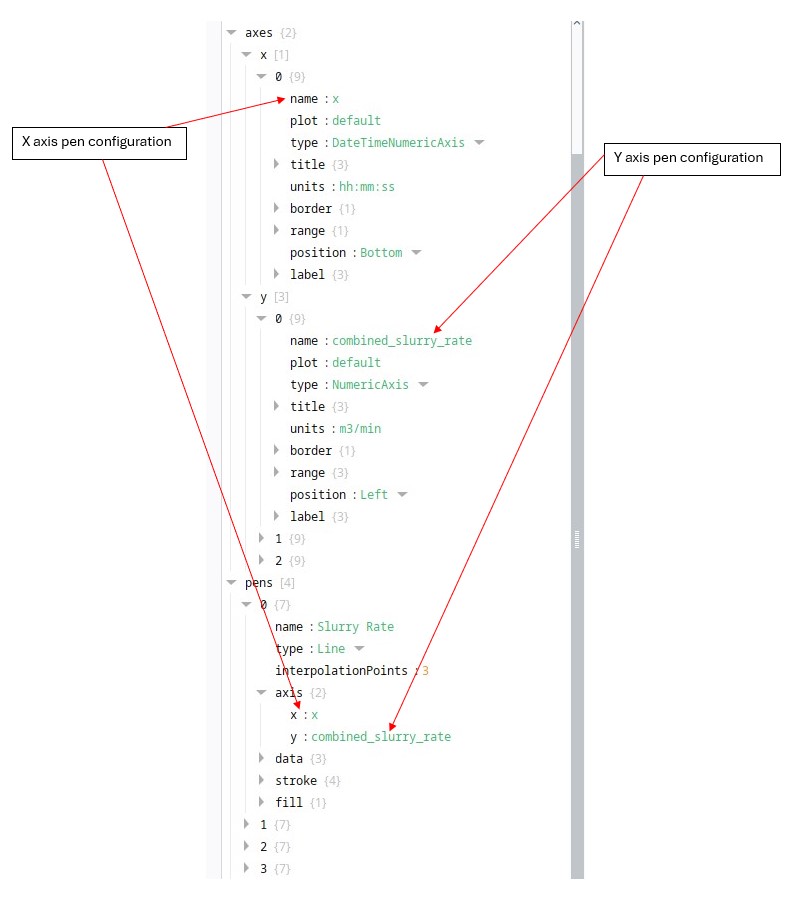
When configuring pens, it is important to ensure that the pen axes correspond to the specific x and y axes that are configured in the props section (see below).
Chart
| Name |
Description |
Property Type |
| height |
The size of the chart on the y axis (as a %) |
String |
| legend |
Props for the legend at the top left |
Object |
Legend
| Name |
Description |
Property Type |
| visible |
Determines whether the legend is displayed on the chart |
Boolean |
| showCheckBoxes |
Determines whether the checkboxes in the legend are displayed |
Boolean |
